What the Grid of Numbers Actually Means
Chapter 2 explained how the sensor produces one integer per photosite. This chapter asks: what is that integer, what are its limits, and what happens when you try to represent too much with too few?
13.1 What a Pixel Is — and Is Not
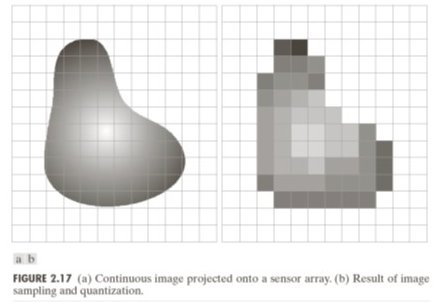
A pixel is a single number: the average brightness measured by one photosite at one grid location. It has:
A position in the 2D array ( = row, = column)
A value — a non-negative integer representing brightness
No internal structure — it is just a number, not a tiny photograph
When a screen renders an image it draws each pixel as a coloured square. That is a display convention, not a property of the data. The underlying data is a 2D array of integers.
Common misconception: zooming into a digital image reveals more detail. It does not — it only makes the squares bigger. All the detail that exists was fixed at capture time by the sensor’s spatial sampling rate (Chapter 1).
23.2 Spatial Resolution
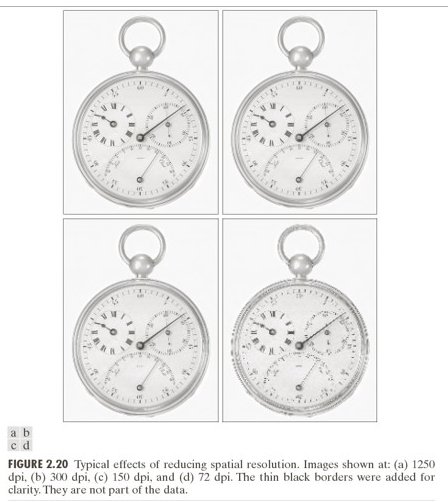
Spatial resolution = the number of pixels: width × height. More pixels means finer spatial sampling, which preserves more scene detail.
But pixels alone say nothing about real-world scale. The same 1000×1000 pixel image could represent a postage stamp or a football field. What matters for computer vision is the ground sampling distance (GSD):
GSD is the real-world size each pixel represents. It determines the smallest detectable feature:
(The factor of 2 is the Nyquist criterion from Chapter 1, applied to spatial resolution.)
Industrial inspection example:
| Setup | GSD | Bolt (20 mm) | Scratch (2 mm) |
|---|---|---|---|
| 5×5 pixel grid | 20 mm/px | 1 pixel | sub-pixel — invisible |
| 25×25 pixel grid | 4 mm/px | 5 pixels | 0.5 pixel — barely detectable |
| 100×100 pixel grid | 1 mm/px | 20 pixels | 2 pixels — detectable |
33.3 Quantization
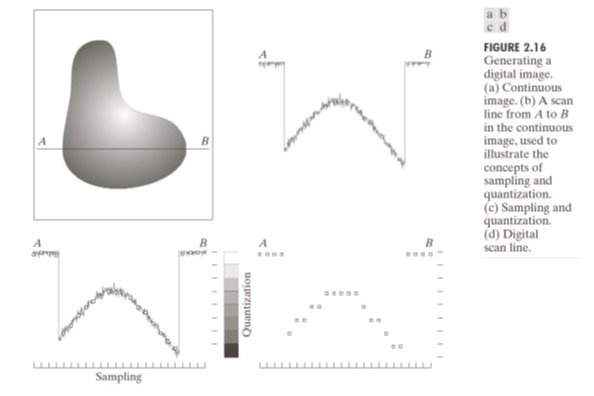
After the sensor measures a voltage proportional to electron count, the ADC maps it to a discrete integer. This mapping — rounding a continuous value to the nearest level — is quantization.
For -bit depth, there are levels. The step size between adjacent levels is:
The quantization error is at most .
| Bit depth | Levels | Max error | Usage |
|---|---|---|---|
| 8-bit | 256 | 0.5 intensity units | JPEG, display |
| 12-bit | 4096 | ~0.06 intensity units | Camera RAW |
| 16-bit | 65536 | ~0.008 intensity units | Scientific imaging |
Quantization error is deterministic and irreversible — unlike shot noise (random), it cannot be averaged away. Once the ADC rounds a value, the fractional part is gone.
43.4 False Contours
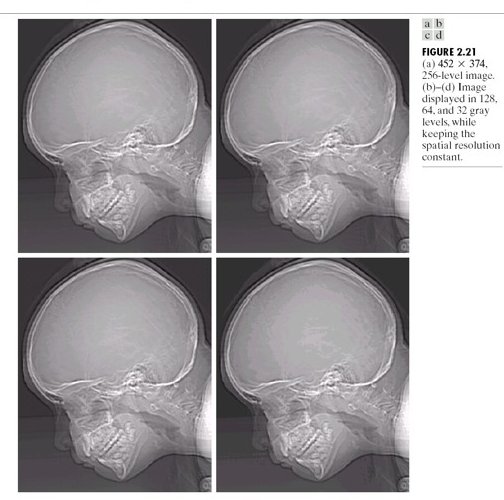
When bit depth is too low, smooth gradients in the scene produce false contours — visible step edges where the true scene varies smoothly.
A 2-bit image has only 4 grey levels (0, 85, 170, 255). A smooth gradient from 0 to 255 jumps in steps of 85 intensity units. Each step is visible as a hard edge — a feature that doesn’t exist in the scene.
False contours are the spatial equivalent of quantization noise. They disappear when bit depth is increased to 8-bit or beyond.
53.5 Two Sources of Error — So Far
| Source | Type | Scales with | Controllable? |
|---|---|---|---|
| Shot noise (Ch 2) | Random | Partially — more light helps | |
| Quantization error (Ch 3) | Deterministic | Yes — more bits eliminates it |
Both corrupt pixel values independently of scene content. We have not yet accounted for contrast changes, shading, colour processing, or compression — those come in Chapters 4–5 and dominate the problem in Chapter 6.
Run:
uv run python tutorials/00_introduction_to_digital_images/part3_pixels_and_resolution.pyto generate the GSD and bit-depth simulations.
6Summary
| Concept | Key fact |
|---|---|
| Pixel | Single integer = average brightness at ; no internal structure |
| Resolution | Width × height; more pixels = finer spatial sampling |
| GSD | Physical size per pixel; sets the smallest detectable feature |
| Nyquist (spatial) | Minimum 2 pixels per feature period to avoid aliasing |
| Quantization | Rounding to levels; error ≤ ; irreversible |
| False contours | Visible step edges from coarse quantization on smooth gradients |
Next → Chapter 4 — Contrast and Dynamic Range: we have integer pixel values — what do those values mean, and what happens when the scene’s brightness range exceeds what the sensor can record?